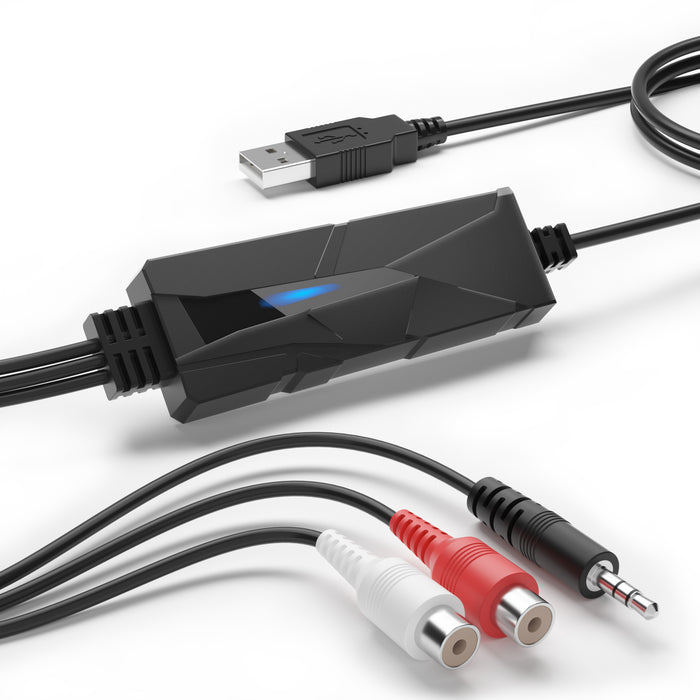


DriverGenius AudioXfer USB Audio Capture Device – Capture Audio from Cassette, Vinyl, MD & More via 3.5mm/RCA Connections for Music Enthusiasts & Podcasters | PC, Mac & Linux Compatible (AV202-B)
The DriverGenius AudioXfer USB Audio Capture Device is the perfect tool for anyone looking to Digitize and Preserve Analog Audio Formats such as Cassette Tapes, Vinyl Records, MD Recordings, and More. Whether you're a Music Enthusiast, Podcaster, or someone who wants to Restore Old Recordings, the AudioXfer offers a Seamless and Reliable Solution. It's Ideal for Users with Cassette Players, MD Players, Home Recording Systems, or Anyone Who Wants to Preserve Timeless Music, Radio Shows, or Personal Audio Memories. The AV202-B Supports Sample Rates of 44.1kHz and 48kHz, Ensuring High-Quality Digital Audio. The Device Features Two Input Options: 3.5mm Stereo Input and R/L Stereo RCA Input. Please Note, However, That Both Inputs Cannot Be Used Simultaneously.
The DriverGenius AudioXfer USB Audio Capture Device is Plug-and-Play, Providing a Hassle-Free Setup with No Additional Drivers Required. It Works Seamlessly with Popular Audio Capture Software Like Audacity, QuickTime, and Others, Giving You the Flexibility to Use Your Preferred Editing Tools. Whether You're Digitizing Music Collections, Restoring Family Recordings, Archiving Radio Shows, or Recording Live Events, the AudioXfer Makes It All Possible. Designed to Be Intuitive, It Is Suitable for Both Beginners and Experienced Audio Enthusiasts Alike. The AV202-B Is Compatible with Windows, macOS, and Linux, Ensuring You Can Preserve Your Audio Across All Major Platforms. Powered via USB, the Device Offers Portability and Convenience, Allowing You to Enjoy Your Digitized Audio on Devices Such as Computers, MP3 Players, and More.
About this item
- USB Audio Capture (AV202-B): Designed to meet the needs of users looking to Digitize and Preserve old Audio Formats like Cassette Tapes & MD Recordings. Suits users with Cassette Players, MD Players, and Home Recording Systems, as well as Audio Enthusiasts wanting to preserve classic music or radio programs. User-friendly and accessible to beginners in digitization
- Dual-Audio-Input Options: Supports Sample Rates of 44.1kHz/48kHz. Provides 2 x input options (Cannot be used Simultaneously): (1) 3.5mm TRS stereo input or (2) R/L stereo RCA audio input. This flexibility allows users to select the most suitable connection for their audio devices, ensuring compatibility with a wide range of legacy equipment and offering maximum ease of use
- Wide-Recording-App-Compatibility: Driver-free design and plug-and-play. Works with many popular third-party audio capture software programs, including Audacity, QuickTime, and more. Before using Audacity, ensure the device is properly connected and configured. This audio capture card supports Windows, macOS, and Linux, ensuring compatibility with a wide range of computer platforms
- Wide Daily Applications: Preserve music collections by digitizing classic albums, tapes, or vinyl. Restore old recordings, such as family tapes, radio shows, or lectures, into digital formats for easy access. Suited for audio editing beginners, enhancing files with software like Audacity. Record and digitize radio broadcasts, interviews, or live events for playback on MP3 players or computers
- Trusted IT Choice Since 2015: With 24/5 after-sales support and 2 years of dedicated service, DriverGenius ensures reliable assistance and exceptional care for your technology needs. DriverGenius team provides seamless experiences with quick, effective solutions. DriverGenius offers cutting-edge technology and outstanding service, making it the top choice for businesses and tech enthusiasts
Documents Download
Frequently Asked Questions
■ Legal Notice: Does Not supports any copy-right protected audio copy!